




















Table of Contents
- • UPDF Review Summary
- • About UPDF
- • Other opinions about UPDF
- • Comprehensive Overview of UPDF
- • UPDF Review
- • UPDF Pro Lifetime Review
- • UPDF Pro Annual Review
- • UPDF AI Assistant Review
- • UPDF Pros & Cons
- • UPDF vs Adobe Acrobat
- • Free Trial and Complimentary Gifts
- • UPDF Return Policy Details
- • UPDF Software Delivery
- • How to Contact UPDF
- • Where to buy UPDF?
- • Conclusion of UPDF reviews & ratings
UPDF Review Summary
UPDF is a versatile PDF editor designed as a cross-platform solution within the software landscape, offering users robust editing, annotation, conversion, and AI-assisted document management features. It generally suits individual professionals, students, and small businesses seeking an affordable, lightweight alternative to more complex and costly PDF editors. Its overall performance is well-regarded for ease of use and functionality, though there are noted limitations in advanced form handling and platform-specific inconsistencies.
Highlights
- Best suited for students, individual professionals, and users needing cross-device PDF editing with a preference for straightforward, budget-friendly tools.
- Comprehensive offering including text and image editing, OCR capability, AI-driven summarization, translation, and cross-platform synchronization across Windows, macOS, iOS, and Android.
- Trade-off includes occasional stability issues with complex PDF forms and some feature limitations on the Mac App Store version due to sandboxing restrictions.
- Overall Rating => 8.2/10 reflecting a strong balance between features, usability, and pricing with room for improvement in advanced functionalities and platform consistency.
Within the broader category of PDF editors, UPDF positions itself as a cost-effective and modern alternative to legacy heavyweights like Adobe Acrobat and Foxit, particularly appealing to users who value simplicity and cross-platform licensing. While it lacks some enterprise-grade integrations or specialized tools, those seeking a polished, multi-device PDF editor will find UPDF a viable contender. For more insights, see the detailed UPDF review, which offers extended evaluations and user feedback to help determine its fit compared to other options.
About UPDF
Handling PDFs can become frustrating when editing tools are bulky or too expensive. Many users struggle with compatibility across devices and platforms, slowing down workflow and adding complexity. These challenges often call for a more streamlined, user-friendly PDF editor that works everywhere.
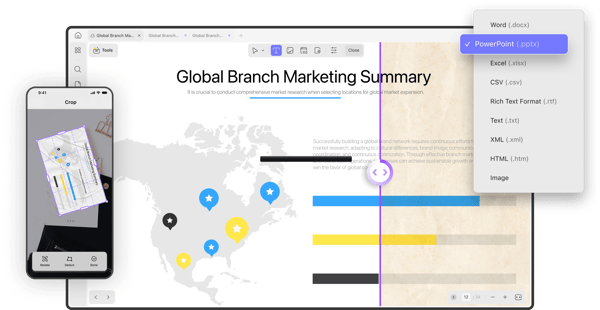
UPDF is a cross-platform PDF editor that fits this need. It belongs to the mid-range category, offering practical editing, annotation, conversion, and OCR features for Windows, macOS, iOS, and Android. It combines standard PDF editing with integrated AI tools to simplify workflows.
UPDF boasts a user base of over 4 million and holds ratings of around 3.6 to 4.5 across Trustpilot and G2. Its affordable perpetual licensing and frequent updates reinforce its growing authority as an Adobe alternative. However, some users note limitations in advanced form handling and occasional AI inaccuracies.
This UPDF review explores these strengths and trade-offs in detail. It helps readers gauge fit based on features, pricing models, and real-world use. UPDF stands as a solid choice when seeking a balance between functionality, cost, and ease of use in PDF editing.
Other opinions about UPDF
Opinions and insights gathered from trusted review articles and authoritative websites covering UPDF.
Comprehensive Overview of UPDF
UPDF is a cross-platform PDF software developed by Superace Software Technology, a company originating in Hong Kong. Established to provide accessible and efficient PDF editing tools, UPDF operates within the software industry, focusing on document management and productivity solutions. It caters to diverse user needs through a single licensing model that supports multiple platforms.
The software was created to simplify PDF handling with a user-friendly interface and integrated AI features. Over time, UPDF has evolved by consistently adding advanced functionalities such as OCR, annotation, and AI-driven document analysis. Its development reflects Superace's mission to enhance document productivity with innovative technology while maintaining affordability.
UPDF serves individuals and enterprises with a wide operational scope spanning Windows, macOS, iOS, and Android. The service model includes perpetual and subscription licenses, supporting synchronization across devices. Although headquartered in Asia, UPDF has established a global presence, facilitating multi-language support and secure cloud storage, positioning it as a versatile PDF solution in the software landscape.
UPDF Review
UPDF is a dynamic software brand specializing in PDF management solutions with a focus on delivering cross-platform accessibility and user-friendly interfaces. It caters to a broad audience that ranges from individual users to professionals requiring efficient document handling tools. The brand prioritizes integrating modern technologies to enhance user productivity across various devices.
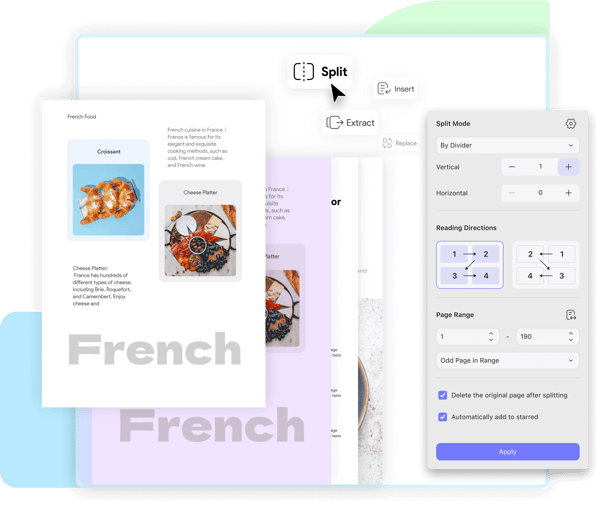
UPDF offers a comprehensive suite of PDF editing tools available on Windows, macOS, iOS, and Android, enabling seamless document interaction regardless of the platform. Its technology incorporates AI-assisted features that streamline workflows through automated summarization, translation, and chat functionality. Emphasizing versatility, UPDF's services span advanced editing, annotation, and OCR capabilities that support multiple languages, positioning the brand as a well-rounded choice in digital document solutions.
UPDF Highlights- Cross-platform accessibility on all major operating systems
- AI-powered document interaction tools
- Versatile editing and annotation features
- Robust OCR technology with extensive language options
- Flexible licensing supporting multiple devices
UPDF Pro Lifetime Review
UPDF Pro Lifetime offers a perpetual license that grants full access to PDF editing, annotating, conversion, and OCR capabilities on up to four devices. The software includes integrated AI tools designed to help users summarize, translate, and interact with PDF documents efficiently. This feature set supports seamless document management across multiple platforms.
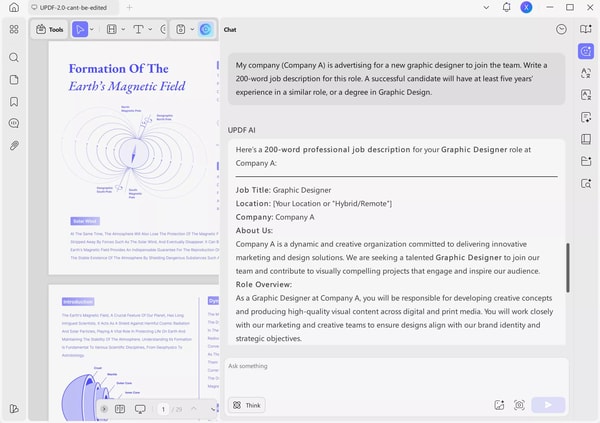
As a cost-effective alternative to Adobe Acrobat, UPDF Pro Lifetime is suitable for students, educators, and professionals who need versatile PDF editing tools without ongoing subscription fees. Its lightweight design helps maintain smooth performance without taxing system resources. This makes it a practical choice for users seeking reliability and ease of use.
The license also provides 102GB of cloud storage and supports Windows, Mac (including Apple silicon), iOS, and Android devices. Pricing information is not provided, but the availability on multiple platforms adds flexibility for managing documents across different environments.
Price $79.99 • updf.com
UPDF Pro Annual Review
The UPDF Pro Annual plan provides comprehensive PDF functionality with text and image editing, annotation, OCR, and conversion available across up to four devices. It features GPT-5 powered AI capabilities, including PDF chat, summarization, and translation to enhance user interaction with documents.
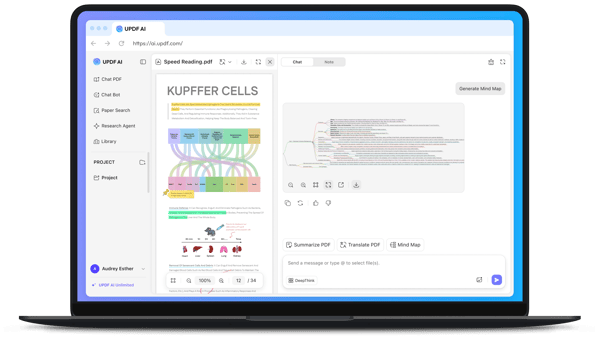
Designed for subscription users, this plan includes 110GB of cloud storage and supports Windows, macOS, iOS, and Android platforms. Regular updates are delivered throughout the yearly subscription to maintain performance and feature enhancements.
This subscription balances versatility and cost-effectiveness compared to higher-priced alternatives, offering scalable solutions suitable for both individual users and professionals. Pricing details are not available in the provided sources.
Price $49.99 • updf.com
UPDF AI Assistant Review
The UPDF AI Assistant subscription adds AI-powered features to the UPDF PDF editor, allowing users to summarize texts, translate content, chat with PDF documents, extract details from images, and convert PDFs into mind maps. It supports multiple platforms including Windows, Mac, iOS, Android, and the web. These capabilities enhance the way users interact with PDFs and improve document accessibility.
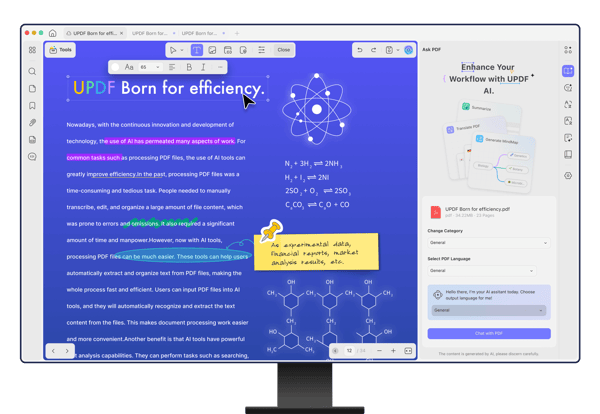
This add-on is designed for researchers, students, and professionals who need advanced tools for managing and extracting information from documents. It simplifies complex data into clear, actionable insights, making it easier to analyze and utilize PDF content effectively in various work or study contexts. Users can engage with PDFs beyond traditional editing features.
UPDF AI Assistant offers tiered subscription plans, providing different usage limits for PDF analysis and question-asking activities. Options include standard and unlimited plans, allowing users to choose the level that best fits their needs. Pricing details are not specified in the available source material.
Price $79 • updf.com
UPDF Pros & Cons
UPDF offers a user-friendly, minimalist interface that simplifies navigation and includes a comprehensive set of editing tools for both text and images. Its multi-device licensing and cross-platform support facilitate seamless document management across desktop and mobile devices, while integrated AI features assist with summarization and translation, enhancing productivity.
Despite these advantages, UPDF has limited support for complex PDF forms and its AI capabilities require an additional subscription, which may affect overall cost-effectiveness. Additionally, users concerned with privacy should note that cloud data is hosted in China, which could raise data security considerations.
- • Intuitive minimalist interface
- • Comprehensive text and image editing
- • Cross-platform support
- • One license for up to four devices
- • Integrated AI summarization and translation
- • Highly accurate OCR with multi-language support
- • Affordable pricing with lifetime license option
- • Seamless desktop-mobile syncing
- • Limited support for complex PDF forms
- • AI features require extra subscription
- • Cloud data hosted in China
UPDF vs Adobe Acrobat
UPDF offers a cost-effective alternative to Adobe Acrobat with both perpetual licenses and subscription options, while Adobe primarily provides subscription-based pricing. UPDF integrates AI-powered features such as summarizing, translating, and interactive tools directly into the app, focusing on lightweight performance and cross-platform compatibility with a single license covering multiple devices.
Adobe Acrobat delivers a comprehensive suite of advanced features and strong enterprise integrations, including extensive form support and specialized tools. While UPDF covers essential PDF editing and competitive OCR functionality, it may not match the breadth of features available in Adobe Acrobat, particularly for complex workflows and enterprise use.

- Offers perpetual license and subscription options
- Includes AI tools for summarizing, translating, and document interaction
- Lightweight performance and cross-platform support
- One license covers multiple devices
- Provides core PDF editing and OCR features

- Primarily subscription-based pricing
- Extensive advanced PDF editing and form support
- Robust enterprise integrations
- Specialized tools for complex workflows
- Comprehensive feature set for professional use
Free Trial and Complimentary Gifts
UPDF provides a free version that allows basic PDF viewing and editing, though saved documents will include a watermark. Users can also access AI Assistant features during a limited free trial, which permits interaction with a set number of PDFs and questions.
From time to time, UPDF offers promotional gifts such as free PDF password removal tools and themed PDF templates with specific purchases. These free and trial options enable users to evaluate the software and its AI enhancements before choosing a paid plan.
UPDF Return Policy Details
Refund requests must be made within 30 days of purchase. Returns are accepted at no charge if initiated within this refund window. Refunds typically apply to cancellations made by the user and subscriptions that have not been used.
Issues resulting from user error or exceeding trial limits are generally excluded from refunds. This policy ensures that refunds are processed based on valid cancellation requests and unused services only.
UPDF Software Delivery
UPDF software is available worldwide through digital download, eliminating the need for physical shipping. Once a purchase is made and an account is registered, users receive instant access to the software. Download links are provided directly via the official UPDF website or authorized platforms to ensure secure delivery.
There are no shipping fees or delivery delays, as access is granted immediately after purchase. Users simply follow the download link to install the software. Availability may depend on regional software regulations and system compatibility, but no other restrictions apply.
How to Contact UPDF
UPDF provides several contact options for users who need assistance or have questions. You can reach out to the support team for help with subscription issues, technical problems, or general inquiries.
- Email: [email protected]
- Alternative Email: [email protected] (for communication issues)
- Official website support resources: FAQs, user guides, and tutorial libraries available at https://updf.com/
Feel free to contact UPDF support if you need help. The customer service team generally aims to respond within one week to ensure your concerns are addressed.
Where to buy UPDF?
When considering a purchase of UPDF, the most reliable and official source is the company's website. Buying directly at updf.com ensures access to the full product range, transparent policies, and secure account management. This channel also provides direct customer support and timely updates. While UPDF may be found on third-party marketplaces, those options can vary in legitimacy and return policies. UPDF does not have a widespread offline retail presence, so online purchase remains the primary and most dependable method.
Conclusion of UPDF reviews & ratings
UPDF stands out in the PDF editing space by offering a straightforward, reliable solution with a clean interface and strong cross-platform support. Its ease of use, integrated AI tools, and comprehensive editing features make it a practical choice for anyone managing PDFs. Through updf.com, users gain access to a versatile tool that balances quality with simplicity, ensuring they can handle PDFs effectively across multiple devices.
If you want to learn more or explore the features firsthand, visiting the official site is a great next step. Many users find confidence in its steady improvements and approachable design over time. Feel free to revisit this UPDF review anytime for a detailed look at what makes this editor a valuable alternative in its category.
Editorial notes reflect aggregated buyer feedback and our independent editorial review of publicly available information. They are for informational purposes only and do not constitute endorsements. Purchases are made at your own discretion, and we are not responsible for transactions or outcomes related to this store. Experiences may vary. This content is assisted by AI and reviewed by our editorial team. While we strive for accuracy, AI-supported information may not always be 100% precise, so please verify any critical details.

